Core Web Vitals for WordPress in 2026 are three metrics: Largest Contentful Paint (LCP) under 2.5 seconds for loading, Interaction to Next Paint (INP) under 200 milliseconds for responsiveness, and Cumulative Layout Shift (CLS) below 0.1 for visual stability. INP replaced First Input Delay in March 2024. Improve them with full-page caching, image optimization, and reserved layout space.
Open the Core Web Vitals report in Google Search Console and you will see three numbers that decide how Google grades your page experience, and how real visitors feel about your site. In 2026 these metrics are still a confirmed ranking signal, and on WordPress they are rarely fixed by one magic plugin. Passing them is about controlling how quickly your largest element loads, how fast your pages respond to interaction, and how stable your layout stays while it loads. This playbook explains each metric, the current thresholds, and a vendor-neutral set of fixes you can apply whether you run a page builder, a custom theme, or managed WordPress hosting.
What Are Core Web Vitals?
Core Web Vitals are a focused set of three user-experience metrics that quantify loading speed, responsiveness, and visual stability. Google folds these Core Web Vitals metrics into its broader page experience assessment, and they feed the Core Web Vitals report inside Google Search Console. Each metric captures how quickly a different moment in the experience happens as a real visitor perceives your WordPress site loading.
- Largest Contentful Paint (LCP) measures loading: specifically how quickly the largest visible element (usually a hero image, heading, or block of text) finishes rendering.
- Interaction to Next Paint (INP) measures responsiveness, how quickly your site responds to a tap, click, or keypress across the whole visit, not just the first one.
- Cumulative Layout Shift (CLS) measures visual stability, how much content unexpectedly moves while the page is still loading.
Two of the three vitals are about speed you can feel, and the third is about trust: nobody likes tapping a button that jumps out from under their finger. Together they describe whether your page feels fast, not just whether a synthetic test says so. A strong score signals a good user experience, which is exactly what Google wants to reward.
What Is INP?
Interaction to Next Paint (INP) is the responsiveness metric that observes every interaction a visitor makes (clicks, taps, and key presses) and reports a value close to the worst of them. It measures the delay from the moment a user interacts to the moment the browser paints the next frame in response. A sluggish INP usually points to heavy JavaScript execution blocking the main thread, which is common on WordPress sites loaded with page-builder scripts, third-party embeds, and tracking tags.
Because INP looks at the full visit rather than a single first input, it is a stricter, more honest measure of how responsive your site really is. Reducing long JavaScript tasks, deferring non-critical scripts, and trimming third-party code are the levers that move it.
Core Web Vitals Thresholds for 2026
Google rates each metric in three bands (good, needs improvement, and poor) based on the 75th percentile of real users. To “pass”, your WordPress site needs good Core Web Vitals scores on all three metrics at that 75th percentile.
| Metric | What it measures | Good | Needs improvement | Poor |
|---|---|---|---|---|
| LCP (Largest Contentful Paint) | Loading | 2.5s or less | 2.5s-4.0s | Over 4.0s |
| INP (Interaction to Next Paint) | Responsiveness | 200ms or less | 200ms-500ms | Over 500ms |
| CLS (Cumulative Layout Shift) | Visual stability | 0.1 or less | 0.1-0.25 | Over 0.25 |
These thresholds are documented by Google’s web.dev Core Web Vitals guide and have stayed consistent into 2026. The targets are deliberately strict because they reflect what good loading speed and responsiveness actually feel like on mid-range mobile hardware, not a high-end desktop.
Why INP Replaced FID
In March 2024, Google replaced First Input Delay (FID) with Interaction to Next Paint as an official Core Web Vital. FID only measured the delay before the browser began processing the first interaction, a narrow, forgiving metric that most sites passed easily even when they felt slow. INP is far more representative: it measures the full latency of interactions throughout the visit, including the time to render the visual response.
The practical impact for WordPress owners is that a site which comfortably passed FID can now fail INP. Heavy admin-ajax calls, unoptimized JavaScript execution, and bloated page-builder bundles that the old first input delay metric ignored now show up clearly. If you only ever optimized for FID, INP is the metric to re-audit first. Google’s INP documentation on web.dev covers the methodology in depth.
How to Improve LCP on Your WordPress Site
LCP is usually the easiest Core Web Vital to move because it responds directly to caching and image work. The goal is to get your largest element (typically a hero image or headline) painted in under 2.5 seconds.
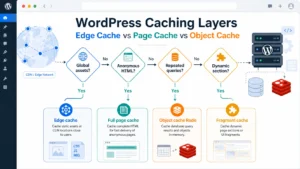
- Serve from cache. Full-page caching cuts server response times dramatically by skipping PHP and database work on repeat requests, which shortens load time across the site. If you are weighing where caching should live, our edge vs page vs object cache decision tree walks through the trade-offs, and our roundup of the best WordPress caching plugins for business sites covers the options.
- Optimize images. Compress and serve next-gen formats (WebP/AVIF), reduce file size, size images correctly, and add a CDN so a content delivery network serves them from a location near each visitor. Image optimization alone often shaves a full second off LCP.
- Cut time to first byte. A slow time to first byte delays everything that follows. Faster hosting, object caching, and fewer blocking queries all reduce server response times, see our guide to reduce TTFB on WordPress.
- Remove render-blocking resources. Render-blocking CSS and JavaScript in the
<head>delay the first paint. Inline critical CSS, defer the rest, and load fonts efficiently, our guide to eliminating render-blocking resources in WordPress covers the technique. - Preload the LCP element. If your hero image is the LCP candidate, preload it and avoid lazy load on above-the-fold images so the browser fetches it immediately.
How to Improve INP on WordPress
INP is a JavaScript problem more than a network problem. Responsiveness suffers when long tasks tie up the browser’s main thread while a visitor is trying to interact, which is why a heavy WordPress core setup stacked with plugins struggles here.
- Reduce and defer JavaScript. Audit which plugins enqueue scripts on every page and dequeue the ones you do not need. Deferring non-critical JavaScript keeps the main thread free to respond to input.
- Break up long tasks. Heavy page-builder and analytics scripts run as single long tasks; splitting or delaying JavaScript execution until interaction lowers INP.
- Limit third-party code. Chat widgets, A/B testing, and ad scripts are frequent INP offenders. Load them after the page is interactive, or remove the ones that do not earn their cost.
- Lean on a performance plugin. Tools such as WP Rocket can defer and delay scripts without hand-editing code, which keeps the site responsive and is the fastest route for most WordPress sites.
For a deeper look at INP and how the browser schedules work, Google’s web.dev INP article is the authoritative reference.
How to Improve CLS on WordPress
Cumulative Layout Shift is about reserving space so nothing jumps, protecting the visual stability of the page. Most WordPress layout shifts come from images, ads, embeds, and web fonts that load without a placeholder.
- Set width and height on images. Explicit
widthandheightattributes (or a CSS aspect-ratio) let the browser reserve the right box before the image arrives, preventing layout shifts. - Reserve space for ads and embeds. Give ad slots and iframes a fixed container so late-loading content does not push the page around.
- Tame web fonts. Use
font-display: swapwith a well-matched fallback so a font swap does not reflow your text. Self-hosting each font also removes a third-party request. - Avoid inserting content above existing content. Cookie banners and notification bars that appear after load are classic CLS culprits, render them in reserved space.
Google’s web.dev CLS guide and LCP guide document the diagnostics for each in detail.
How to Check Core Web Vitals for WordPress
Before you optimize, measure the right way. The single biggest mistake WordPress owners make is trusting a one-off lab test while Google ranks on field data from real visitors. Use these tools to check Core Web Vitals accurately:
- Field data (what Google uses): the Chrome User Experience Report (CrUX) aggregates real visits over 28 days. The Core Web Vitals report in Google Search Console and the “field data” panel in PageSpeed Insights both draw from it. This is the data that affects your ranking.
- Lab data (for debugging): the PageSpeed Insights Lighthouse run and Chrome DevTools give you a repeatable lab score to test fixes against. Lab data is great for diagnosis but can disagree with field data because it uses one simulated device and network.
- Chrome DevTools: the Performance panel records exactly which long tasks hurt INP and which element is your LCP, so you can target the real bottleneck rather than guessing.
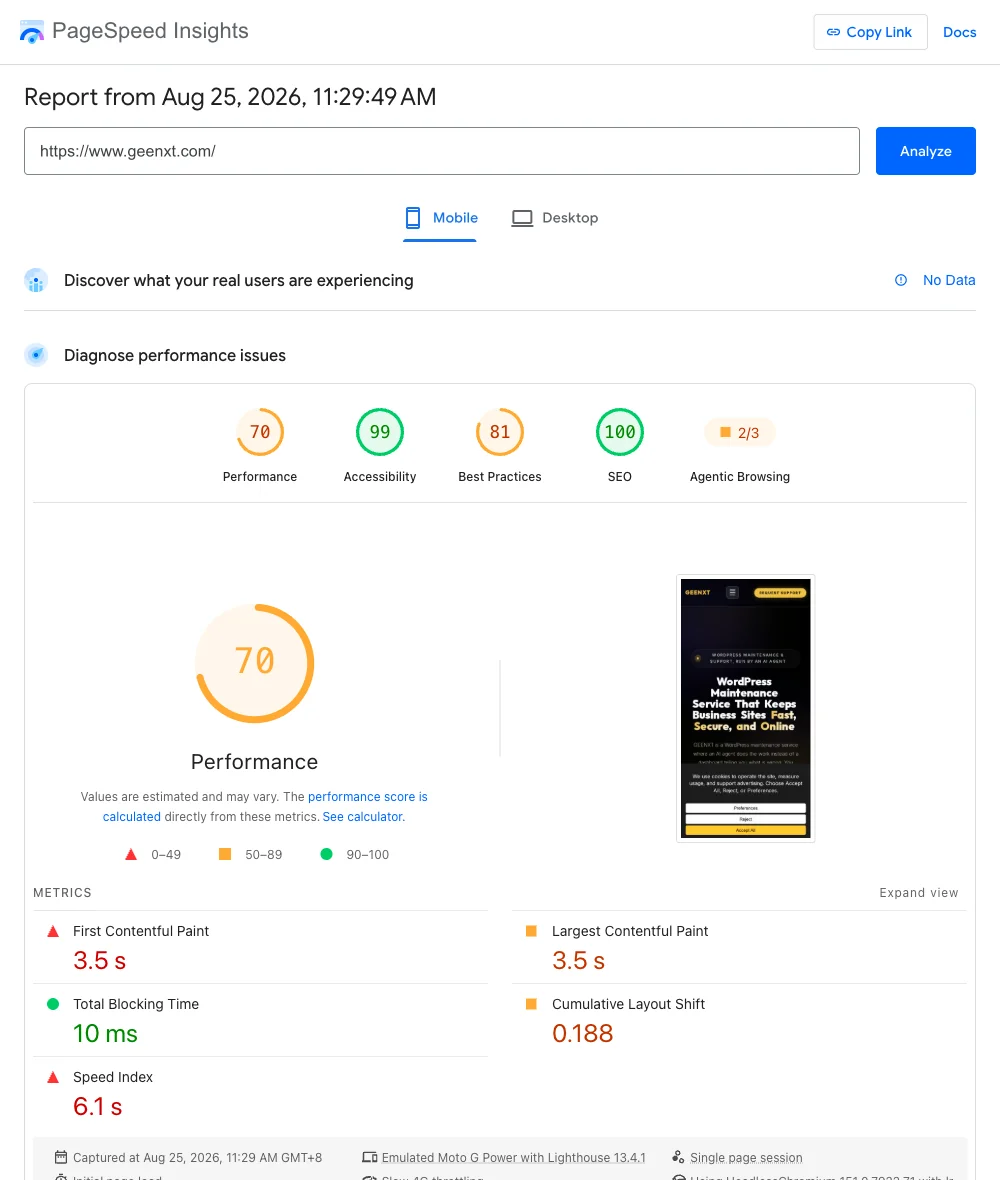
Run both: use field data to know whether you pass, and lab data to find and verify fixes. If you want a structured routine, our website performance testing workflow and website speed audit guide show how to combine the tools into a repeatable check.
A Core Web Vitals Optimization Plan for WordPress
Use this as a step-by-step plan to take a WordPress site from failing to passing Core Web Vitals. Work top to bottom: the early steps deliver the biggest wins for loading speed and responsiveness.
- Baseline with field data. Open the Core Web Vitals report in Google Search Console and note which of LCP, INP, and CLS fail, and on which templates.
- Enable full-page caching. Turn on a caching plugin or host-level cache to cut server response times and improve LCP immediately.
- Optimize and offload images. Convert to WebP/AVIF, size correctly, lazy load below-the-fold images, and serve everything through a CDN.
- Remove render-blocking CSS and JavaScript. Inline critical CSS, defer the rest, and load fonts with
font-display: swap. - Reduce JavaScript for INP. Dequeue unused scripts, defer and delay non-critical JavaScript, and limit third-party code.
- Reserve layout space for CLS. Add width and height to images, fix containers for ads and embeds, and stop content from shifting.
- Re-measure in lab, then confirm in field. Validate each change in PageSpeed Insights or DevTools, then wait for CrUX field data to confirm the real-world improvement.
Caching deserves special attention because it touches every metric. A page cache stores the finished HTML so repeat requests skip PHP and the database, an object cache speeds up the dynamic queries behind logged-in and WooCommerce pages, and an edge cache serves loading-critical assets from a location near each visitor. WordPress caching layered correctly is the single biggest lever for faster loading on most sites, a well-tuned cache can take a page load from multiple seconds to near-instant. The trade-off is freshness: aggressive caching can serve stale content if your invalidation is wrong, so match the caching strategy to how often each template changes.
Common Reasons for Poor Core Web Vitals Scores on WordPress
When a WordPress site posts poor Core Web Vitals, the cause is usually one of a handful of repeat offenders:
- Cheap or overloaded hosting drives up time to first byte and server response times, hurting LCP before a single image even loads.
- Unoptimized images: large, uncompressed hero images with a big file size are the most common LCP failure.
- Plugin and script bloat: too many plugins enqueuing CSS and JavaScript inflates load time and wrecks INP.
- No caching: every visit hits PHP and the database, so pages are slow to load.
- Layout shifts from images, ads, and fonts loading without reserved space.
Most poor Core Web Vitals scores trace back to two or three of these at once, which is why a structured optimization plan beats chasing a single metric. Fixing them also lifts loading speed and overall web performance, not just the score in Google Search.
Final Recommendation
Treat Core Web Vitals as an ongoing part of WordPress optimization and maintenance, not a one-time fix, and fold the monthly check into the same cadence as the rest of your site upkeep; our WordPress maintenance checklist for business websites lays out that broader routine. Pass all three at the 75th percentile of real users, LCP under 2.5s, INP under 200ms, CLS under 0.1, by getting caching, image optimization, and JavaScript under control, then re-check field data monthly. The sites that win on page experience are the ones that keep measuring after the first round of fixes, because new plugins, embeds, and content can quietly undo your gains. Set a recurring reminder to review the Core Web Vitals report each month, watch your field data after every major theme or plugin change, and treat any drop below the good thresholds as a regression to fix before it costs you ranking and conversions. If you would rather hand the whole workflow to a specialist, our WordPress performance optimization service tunes Core Web Vitals end to end and keeps them green.
FAQs
What are the three Core Web Vitals in 2026?
The three Core Web Vitals are Largest Contentful Paint (LCP) for loading, Interaction to Next Paint (INP) for responsiveness, and Cumulative Layout Shift (CLS) for visual stability. Aim for LCP under 2.5 seconds, INP under 200 milliseconds, and CLS below 0.1.
Why did INP replace FID in Core Web Vitals?
Google replaced First Input Delay with Interaction to Next Paint in March 2024 because FID only measured the delay before the first interaction was processed. INP measures the full responsiveness of every interaction during a visit, making it a far more accurate reflection of how a WordPress site actually feels to use.
Do Core Web Vitals affect WordPress SEO rankings?
Yes. Core Web Vitals are part of Google’s page experience signals and remain a ranking factor in 2026. They are most often a tie-breaker between pages of similar relevance, and a strong score also improves user experience and conversions, so the benefit goes beyond ranking alone.
What is a good INP score for WordPress?
A good INP score is 200 milliseconds or less at the 75th percentile of real users. Between 200 and 500 milliseconds needs improvement, and over 500 milliseconds is poor. Reducing JavaScript execution is the most effective way to improve INP on WordPress.
Which WordPress plugins help improve Core Web Vitals?
Caching plugins and performance plugins such as WP Rocket help by enabling full-page caching, deferring JavaScript, optimizing images, and loading critical CSS. The right plugin choice depends on your hosting and stack, see our guide to the best WordPress caching plugins for business sites.
How can I measure Core Web Vitals for my WordPress site?
Use field data from the Core Web Vitals report in Google Search Console and the Chrome User Experience Report for the scores Google ranks on, and lab tools like PageSpeed Insights and Chrome DevTools to diagnose and verify fixes. Field data reflects real visitors; lab data is for repeatable testing.
What causes poor Core Web Vitals scores on WordPress?
The most common causes are slow hosting and high time to first byte, large unoptimized images, plugin and JavaScript bloat, a lack of caching, and layout shifts from images, ads, or fonts loading without reserved space. Most failing sites have two or three of these issues at once.
How long do Core Web Vitals fixes take to show in Google Search Console?
Because Google Search Console uses 28-day field data from the Chrome User Experience Report, improvements typically take a few weeks to fully reflect after you deploy them. Lab tools show the change immediately, but the field data that affects ranking updates gradually as new real-user visits accumulate.
For more free guides like this one, see GEENXT’s Resources Hub.