What is Shopify Liquid? Shopify Liquid is the template language used in Shopify themes to combine theme code with store data. Shopify Liquid programming lets developers output products, collections, articles, images, prices, and settings, then control presentation with tags, filters, sections, snippets, and templates.
For merchants, Liquid is the layer that turns product data into a working storefront. For developers, it is the programming model that decides what appears on a product page, collection page, blog article, cart, search page, and custom landing page. A strong Shopify Liquid implementation makes the store easier to edit, faster to maintain, and safer to scale as campaigns, products, apps, and design needs change.
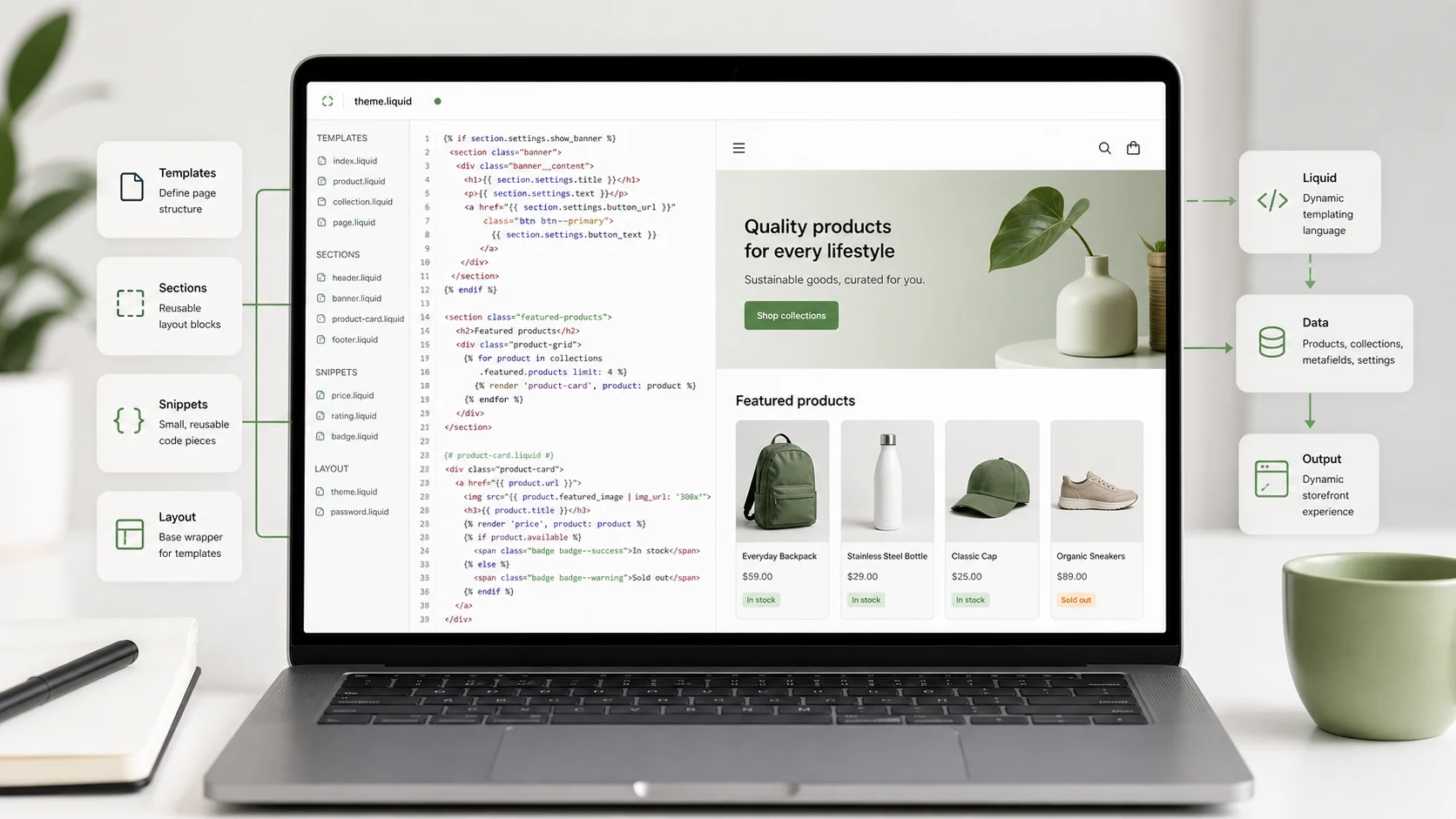
Liquid is not the same thing as JavaScript, CSS, or the Shopify Admin. It runs as part of theme rendering and is mostly concerned with output, logic, and structured storefront presentation. JavaScript handles browser behavior. CSS handles styling. Shopify Liquid connects the theme to Shopify objects and merchant-controlled settings.
That distinction matters because many Shopify theme problems come from using the wrong layer for the job. A product badge that depends on inventory state usually belongs in Liquid. A carousel interaction belongs in JavaScript. A color system belongs in CSS and theme settings. A clean template separates those responsibilities so future edits do not break checkout confidence, merchandising workflows, or page performance.
How Shopify Liquid Fits Inside a Theme
A Shopify theme is made from templates, sections, snippets, assets, layouts, configuration files, and locales. Liquid appears across many of those files, especially in layout, section, snippet, and older template files. Modern Shopify themes commonly use JSON templates to define which sections render on a page and in what order, while the sections themselves use Liquid to output markup and store data.
Think of a JSON template as the page structure and a Liquid section as the reusable component that renders content. For example, a product JSON template can reference a main product section and a product recommendations section. Each section can then use Liquid objects, section settings, and blocks to render the product page experience.
That structure gives merchants more control in the theme editor. They can add, remove, and reorder compatible sections without asking a developer to hard-code every page variant. Developers still need to define the section logic carefully, because Liquid controls the actual output and the guardrails around optional content.
Liquid Basics: Objects, Tags, Filters, and Syntax
Shopify Liquid programming starts with three core ideas: objects, tags, and filters. A practical Shopify Liquid tutorial should explain all three because most template work is a combination of output, logic, and formatting.
Objects are the data available to a template. A product page might expose product data, so the template can output details such as the product title, vendor, description, media, price, variants, or availability. Objects are usually printed with double curly braces.
<h1>{{ product.title }}</h1>
<p>{{ product.vendor }}</p>
Tags control logic. They use curly braces and percent signs, and they do not directly print content unless the tag is designed to render something. Common examples include if, for, assign, capture, render, paginate, and schema.
{% if product.available %}
  <p class="product-status">In stock</p>
{% else %}
  <p class="product-status">Sold out</p>
{% endif %}
Filters modify output. They are chained with a pipe character. A filter can format money, resize an image URL, escape text, strip HTML, truncate a description, or transform a string before it appears on the page.
<h2>{{ collection.title | escape }}</h2>
<p>{{ collection.description | strip_html | truncate: 160 }}</p>
This object-tag-filter pattern is the foundation of liquid templating. The best theme code keeps Liquid syntax readable. If a template needs several nested conditions, repeated markup, or complex display rules, move reusable pieces into snippets or sections instead of letting one file become difficult to reason about.
A Simple Product Template Pattern
Product pages are where many developers first learn Shopify Liquid. A basic product view needs to show the product title, media, price, variant options, add-to-cart controls, and supporting content. The template should also handle missing or optional content gracefully.
<article class="product">
  <header class="product__header">
    <h1>{{ product.title }}</h1>
    {% if product.vendor != blank %}
      <p class="product__vendor">{{ product.vendor | escape }}</p>
    {% endif %}
  </header>

  <div class="product__description">
    {{ product.description }}
  </div>

  {% if product.available %}
    <button type="submit">Add to cart</button>
  {% else %}
    <button type="button" disabled>Sold out</button>
  {% endif %}
</article>
This example is intentionally simple. A production product form needs variant handling, accessibility labels, price updates, selling plans if subscriptions are supported, product media handling, error states, and integration with Shopify’s expected cart behavior. The point is that Liquid should express clear storefront logic without hiding critical assumptions.
The more complex the product experience becomes, the more important it is to keep responsibilities separated. Use section settings for merchant-editable text and layout options. Use snippets for repeated markup such as badges, price displays, icons, and media items. Use JavaScript only where the browser needs to respond after the page has loaded.
Templates, Sections, Blocks, and Snippets
Shopify template language work becomes easier when each file type has a clear job.
Templates define the page type and the sections used on that page. A product template, collection template, page template, article template, or search template should answer the question: what major content regions belong here?
Sections are reusable page regions. A section might render a hero, product information area, featured collection, FAQ, testimonial row, comparison table, or rich text block. Sections can expose settings and blocks so merchants can customize content in the theme editor.
Blocks are smaller editable pieces inside a section. A FAQ section might have question-and-answer blocks. A product feature section might have icon blocks. A banner section might have heading, text, and button blocks. Blocks are valuable when merchants need repeatable content without editing code.
Snippets are reusable code partials. They are ideal for markup that appears in multiple places, such as product cards, price components, social icons, responsive images, badges, or form messages. A snippet should be focused and predictable.
{% render 'price', product: product %}
{% render 'product-card', product: recommended_product %}
Use render with explicit variables where possible. That makes dependencies clearer and reduces the risk that a snippet behaves differently because it accidentally relies on context from a parent template.
Section Schema and Merchant-Controlled Settings
The schema tag is one of the most important parts of Shopify theme development. It defines how a section appears in the theme editor and which settings the merchant can control. A well-designed schema lets merchants change content safely without opening the code editor.
{% schema %}
{
  "name": "Feature banner",
  "settings": [
    {
      "type": "text",
      "id": "heading",
      "label": "Heading",
      "default": "New collection"
    },
    {
      "type": "url",
      "id": "button_link",
      "label": "Button link"
    }
  ],
  "presets": [
    {
      "name": "Feature banner"
    }
  ]
}
{% endschema %}
The Liquid inside the section can then use those settings.
{% if section.settings.heading != blank %}
  <h2>{{ section.settings.heading | escape }}</h2>
{% endif %}

{% if section.settings.button_link != blank %}
  <a href="{{ section.settings.button_link }}">Shop now</a>
{% endif %}
This is where technical implementation and merchant experience meet. Too few settings force every change into development. Too many settings make the theme editor confusing and increase the chance of inconsistent pages. Good Shopify Liquid programming gives merchants meaningful control while protecting brand, accessibility, and layout integrity.
Common Shopify Liquid Mistakes
One common mistake is treating Liquid like a general-purpose application language. Liquid is powerful for rendering storefront templates, but it should not carry business logic that belongs in apps, Admin workflows, metafield architecture, or backend integrations. If a rule affects fulfillment, pricing governance, tax, inventory sync, or customer account logic, confirm whether theme Liquid is the right layer before building it there.
Another mistake is skipping blank-state handling. Store data changes. A product may have no vendor, a collection may have no image, a metafield may be empty, and a merchant may remove a section setting. Defensive Liquid checks prevent broken markup and awkward empty containers.
{% if product.metafields.custom.short_description != blank %}
  <p>{{ product.metafields.custom.short_description | escape }}</p>
{% endif %}
A third mistake is repeating the same markup across templates. Repetition makes redesigns slower and increases inconsistency. If product cards are hard-coded in five files, a single badge update becomes five chances to miss something. Snippets and focused sections reduce that maintenance burden.
Developers should also avoid overloading one section with too many unrelated purposes. A “do everything” section can look flexible at first, but it often becomes hard to test and difficult for merchants to understand. Smaller sections with clear roles usually age better.
Performance and Maintainability
Liquid decisions affect performance because templates control what gets rendered, which images are requested, how many loops run, and how much markup reaches the browser. A slow Shopify theme is rarely caused by Liquid alone, but poor Liquid structure can contribute to heavy pages, duplicated elements, unused assets, and fragile app integrations.
Use loops carefully. Limit collection and product loops when the page only needs a small number of items. Avoid rendering expensive repeated markup when a simpler component will do. Keep snippets focused so a product grid does not load unnecessary badges, scripts, or hidden content for every card.
Image handling deserves special attention. Product media, collection images, and promotional banners should use Shopify image filters and responsive markup patterns rather than hard-coded oversized images. The exact implementation should be checked against the current theme architecture, but the principle is stable: output the right media for the layout instead of forcing every visitor to download the largest asset.
Maintainability is just as important as speed. Name snippets and settings clearly. Keep section schema labels understandable for non-developers. Add comments only when they explain a non-obvious decision. Review theme code before major campaigns so last-minute merchandising work does not introduce regressions.
When to Get Shopify Development Help
Many Liquid edits are small: changing a section label, adding a conditional badge, adjusting a product card, or creating a custom landing page section. Those changes can be handled quickly when the theme is well organized.
You should get Shopify development help when the change affects revenue-critical pages, product forms, cart behavior, checkout-adjacent messaging, structured product data, app blocks, localization, accessibility, or performance. Those areas need testing because a visual change can create operational consequences.
For example, a custom sale badge may look simple, but it might depend on compare-at price, customer tags, variant availability, discount logic, or markets. A product template redesign might affect variant selection, media galleries, subscriptions, analytics events, and add-to-cart behavior. A developer should confirm those flows before the change goes live.
If your team is choosing between Shopify, WooCommerce, BigCommerce, Magento, or another ecommerce platform, Liquid is only one part of the decision. Shopify theme development works best when the business can operate within Shopify’s commerce model and needs strong storefront customization. If the bigger question is platform ownership, compare that decision against your catalog, integrations, team skills, and long-term support model. Geenxt’s guides to WooCommerce vs Shopify for business websites and Magento vs BigCommerce can help frame those broader platform tradeoffs.
Shopify Liquid Development Checklist
Use this checklist before approving a new Shopify Liquid template or section:
- Does the template use the correct Shopify objects for the page type?
- Are optional fields checked before output?
- Are merchant-editable settings clear in the theme editor?
- Are repeated components moved into snippets or reusable sections?
- Are product forms, variant states, and add-to-cart behavior tested?
- Are images output with responsive sizing expectations?
- Are app blocks, metafields, and custom data handled deliberately?
- Does the code avoid placing business-critical backend logic in the theme?
- Does the page still work when content is missing or reordered?
- Is the implementation easy for another developer to read later?
This kind of review is practical, not academic. Shopify stores change often. Promotions, product launches, landing pages, apps, and seasonal campaigns all put pressure on the theme. Cleaner Liquid gives the business more room to move without turning every update into a risk.
FAQ
Is Shopify Liquid a programming language?
Shopify Liquid is a template language. It includes programming concepts such as variables, conditions, loops, filters, and reusable partials, but its main purpose is rendering storefront theme output from Shopify data.
Is Liquid only used by Shopify?
Liquid was created by Shopify and is used in Shopify themes, but Liquid also exists as an open-source template language used by other projects. Shopify themes use Shopify’s own Liquid objects, tags, filters, and storefront-specific behavior.
Do Shopify themes use Liquid templates or JSON templates?
Modern Shopify themes commonly use JSON templates to define page structure with sections. The sections and snippets still use Liquid to render the actual storefront markup and connect to store data.
Can merchants edit Shopify Liquid?
Merchants can edit theme code if they have access, but most routine content and layout changes should happen through the theme editor. Developers use section schema and settings to expose safe controls without requiring code edits.
When should I use a snippet in Shopify Liquid?
Use a snippet when the same focused piece of markup appears in more than one place, such as a product card, price display, badge, icon, or image component. Snippets reduce duplication and make future changes easier.
Get Shopify Dev Help
Shopify Liquid is most valuable when it makes the storefront easier to operate, not just more custom. The goal is a theme that renders the right product and content data, gives merchants useful controls, protects important buying flows, and remains maintainable after the launch.
If your Shopify theme needs custom templates, reusable sections, product page improvements, app-block cleanup, or a safer development workflow, start with a theme audit. Map what the store needs to change, which parts belong in Liquid, which belong in apps or settings, and which flows need testing before release. For teams searching for Shopify theme dev help, start with Geenxt’s ecommerce development services so the work is tied to platform, content, SEO, and conversion requirements together.