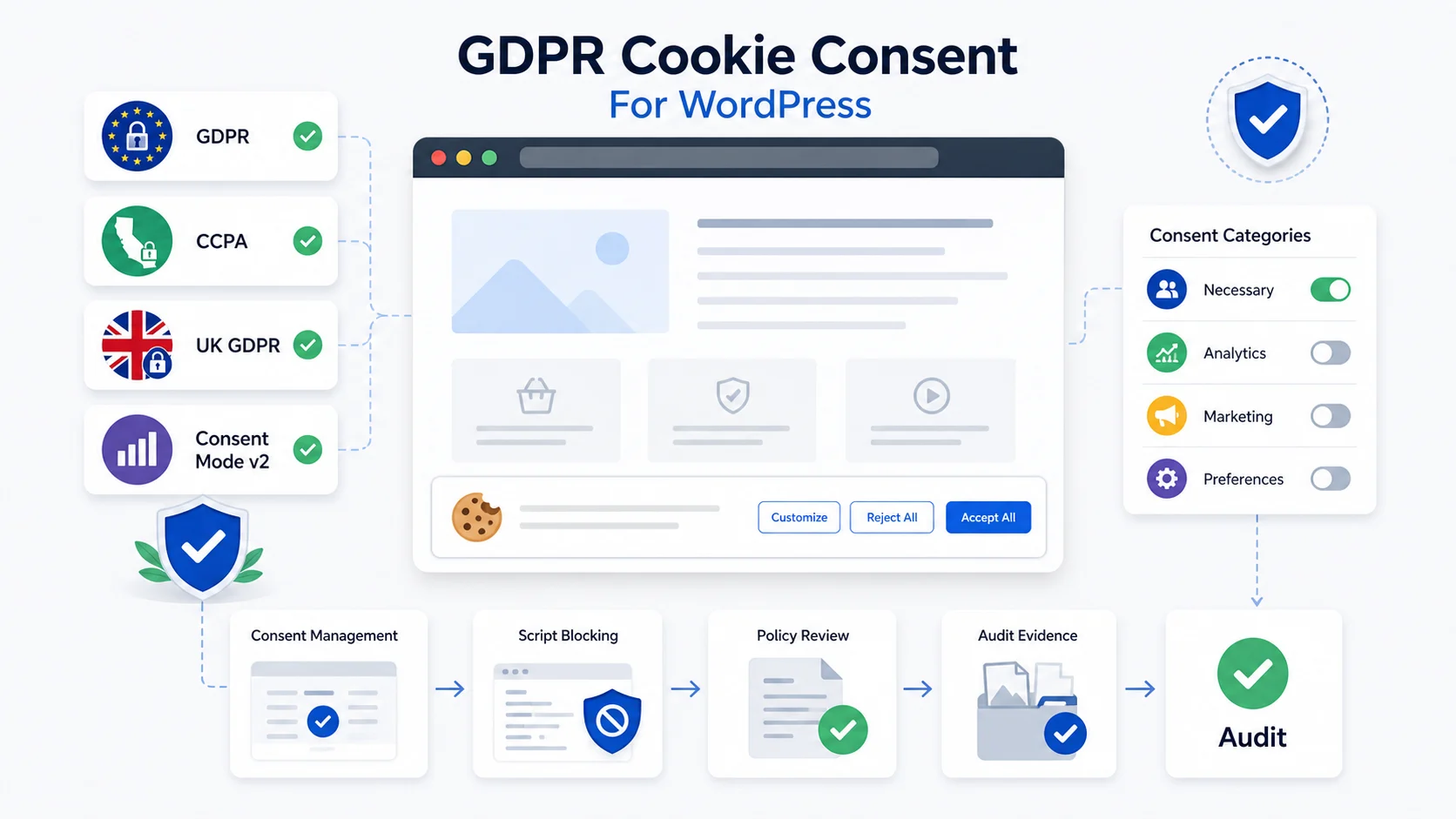
A WordPress site is GDPR cookie compliant only when non-essential scripts wait for a valid choice, visitors can refuse tracking as easily as accept it, consent is logged, and the live site matches its privacy and cookie notices. A banner alone is not compliance: the banner must actually block analytics and marketing tags until the user opts in.
The search intent behind gdpr cookie consent wordpress is practical: site owners want to know what to block, what to disclose, which tool to use, and how to prove the setup works. Searches like cookie banner WP, GDPR WordPress plugin, and CCPA WordPress usually point to the same operational issue: the banner must control real scripts, not just display a message. Plugin choice also matters: a dedicated consent management platform blocks scripts by category, while an all-in-one security suite’s consent module is often thinner. CCPA also differs from UK GDPR in what counts as a valid opt-out.
This guide explains gdpr cookie compliance for WordPress, including the difference between GDPR, UK rules, CCPA, Consent Mode v2, plugin selection, internal policy links, and the audit evidence a site owner should keep. It is not legal advice. Use it as a technical checklist, then confirm legal applicability with qualified counsel.
For related Geenxt resources, see Security & Compliance, the Privacy Policy, the Editorial Policy, and our WordPress security checklist.
What GDPR Cookie Compliance Means for a WordPress Site
GDPR is an EU data protection law, but a cookie setup is also affected by ePrivacy rules, the EU cookie law, and UK PECR. In practical WordPress terms, the key question is whether the site stores or accesses information on a visitor’s device before the visitor makes a valid choice.
A modern WordPress site can load analytics, ad pixels, form tools, live chat, embedded videos, maps, spam protection, affiliate scripts, CRM forms, payment tools, CDN features, and tag manager containers. Some tools are needed to deliver the page or keep the site secure. Others are optional and may require consent before they run.
This gap between a banner existing and a banner actually working is common. Across GEENXT’s WordPress Support audits in the first half of 2026, roughly 4 in 10 client sites arrived with at least one analytics or marketing script already firing before any cookie choice had been made, usually because the banner displayed correctly but the underlying script queue was never wired to it.
The safest technical rule is simple: do not load non-essential cookies, tracking pixels, or scripts until the user has accepted the matching category.
| Cookie or script type | Typical treatment | WordPress examples |
|---|---|---|
| Strictly necessary | Usually allowed when required for the service | Login sessions, cart state, security checks, consent preference storage |
| Preferences | Often consent-based unless essential | Language, display, or region settings |
| Analytics | Often consent-based in EU and UK contexts | Analytics tags, heatmaps, behavior tracking |
| Marketing | Consent-based where opt-in applies | Ad pixels, remarketing, audience building |
| Embedded content | Often blocked until interaction or consent | Videos, maps, social embeds, external widgets |
The distinction matters because privacy regulations such as GDPR focus on lawful processing and user control, while privacy regulations like the GDPR also expect transparency. A generic banner with vague cookie text is weak if analytics and marketing tools already fired before the visitor acted.
How a Cookie Banner Should Capture User Consent
A cookie banner should offer a real choice. For GDPR-style consent, the visitor should be able to accept, reject, or manage optional categories with comparable clarity. A banner should not treat scrolling, silence, or closing a popup as approval.
A practical cookie consent banner should include:
| Requirement | Implementation detail |
|---|---|
| Clear accept and reject choices | Make both visible on the first layer when consent is required |
| Granular control | Let users select specific cookie categories such as analytics and marketing |
| No pre-ticked optional boxes | Optional categories should wait for explicit consent |
| Prior blocking | Optional tags should not load before choice |
| Easy withdrawal | Add a persistent link to cookie settings in the footer |
| Accurate disclosure | Explain vendors, purposes, retention, and withdrawal options |
| Consent evidence | Store a consent log with state, timestamp, and policy version where appropriate |
| Accessibility | Ensure keyboard access, readable labels, focus control, and mobile usability |
A cookie notice is not enough if it only informs people. Consent requires an action. The user should understand what will happen when the user gives consent, and the preference center should make it easy to manage user consent later.
When you add a cookie consent banner, do not hide the reject button in a second screen or make acceptance visually dominant. A banner for GDPR should avoid dark patterns and should make refusal as understandable as acceptance.
GDPR, UK GDPR, CCPA, and Consent Mode v2 Are Different
Many WordPress businesses reach visitors in multiple regions, so one banner may need to support different rules.
| Area | Main concern | Practical WordPress impact |
|---|---|---|
| GDPR and ePrivacy | Consent and personal data processing | Block non-essential analytics, advertising, and similar tags until valid choice |
| UK GDPR and PECR | Cookies, pixels, tags, and storage access | Provide clear information and obtain active consent unless an exemption applies |
| GDPR and CCPA | Different privacy models | GDPR often focuses on opt-in consent for non-essential tracking; CCPA often focuses on opt-out rights for sale or sharing |
| Google consent framework | Google tag behavior after consent status is known | Set defaults before tags run, then update signals after user choice |
CCPA compliance is not the same as GDPR compliance. CCPA and CPRA can require clear opt-out controls for sale or sharing, especially where targeted advertising, retargeting, or cross-context behavioral advertising is used. Covered businesses may also need to honor Global Privacy Control signals.
A site can be GDPR compliant in its cookie behavior and still need CCPA controls if its California data practices trigger those obligations. The reverse can also be true. The operational goal is not to copy one banner everywhere; it is to match the control model to the user, region, technology, and data flow. In the UK, the Information Commissioner’s Office sets out when prior consent is required for cookies under PECR (ICO guidance).
Where WordPress Cookie Consent Plugins Usually Fail
Most problems are not caused by the visible wording. They happen because scripts run too early or the policy does not match the live site.
| Failure | Why it matters | How to check |
|---|---|---|
| Analytics loads before consent | Optional tracking may happen before choice | Open a clean browser profile and inspect cookies before clicking |
| Ad pixels are hard-coded | The banner cannot control scripts outside its scope | Check theme header, footer scripts, GTM, and plugin fields |
| GTM fires tags by default | Tag Manager can bypass consent controls | Review triggers, consent settings, and default state |
| Embeds load immediately | Video or map providers may place cookies before interaction | Use click-to-load placeholders |
| Policy pages are generic | Users are not properly informed | Compare the policy with live vendors and cookies |
| No withdrawal path | Consent should be changeable later | Add a footer preference link |
| Scan is stale | New tools may not be categorized | Repeat cookie scanning after stack changes |
The browser is the source of truth. If a non-essential cookie appears before the visitor chooses, the implementation needs correction.
From a consent management view, this is a legal requirement question, not a design preference. The cookie consent solution should reflect cookie consent requirements, following cookie law and cookie law requirements where they apply. For a WordPress website, the consent banner on your WordPress implementation should be tested against the scripts that actually run.
Choosing a WordPress GDPR Cookie Consent Plugin
A cookie consent plugin can help, but it cannot guarantee compliance by itself. The best WordPress GDPR cookie consent plugins share the same traits: they block scripts before consent, store evidence, and respect regional rules. The correct tool depends on region exposure, analytics setup, advertising stack, ecommerce needs, tag manager usage, languages, and maintenance capacity.
What to Look for in a WordPress Cookie Consent Plugin
For a plugin for WordPress, prioritize capabilities over popularity:
| Capability | Why it matters |
|---|---|
| Prior script blocking | Stops optional tags before consent |
| Category controls | Lets visitors approve analytics but reject marketing |
| Record keeping | Supports audit evidence and historical review |
| Region rules | Helps serve different choices in EU, UK, California, and other regions |
| Tag manager support | Reduces bypass risk when GTM controls tags |
| Preference center | Lets users return to cookie settings later |
| Accessibility | Keeps controls usable for keyboard and screen-reader users |
| Documentation | Reduces configuration errors after updates |
A cookie consent plugin for WordPress should integrate with the way the site loads scripts. A GDPR cookie consent plugin may be appropriate if it can block scripts, maintain records, and connect to a preference center. A WordPress cookie consent plugin should also be tested against cached pages, performance plugins, and page builders. Shortlist two or three plugins, then test each one against the scripts your live site actually loads.
Avoid assuming the free version is enough. A free WordPress plugin may display a banner but lack complete blocking, vendor inventory, consent logs, or region rules. A free WordPress cookie tool may be acceptable for a simple informational site, but active advertising, ecommerce, membership, or lead generation usually needs stronger controls.
Look for whether the plugin supports category controls and whether the plugin supports multiple languages if the site serves more than one language. The plugin also needs a clear update history and documentation for caches, CDNs, and tag managers.
WordPress Cookie Consent Plugin Implementation Details
How a WordPress Cookie Consent Plugin Should Block Scripts
WordPress makes cookie consent harder because scripts can enter through many paths. A consent tool should be checked against:
| Area | What to verify |
|---|---|
| WordPress dashboard | Analytics, ad, and marketing integrations configured through admin screens |
| Theme files | No hard-coded pixels in headers, footers, or templates |
| WordPress themes | Built-in embeds or tracking options do not bypass consent |
| Page builders | Maps, videos, forms, and widgets do not load too early |
| Header/footer script tools | No duplicate tracking snippets outside banner control |
| Tag Manager | Tags require consent and do not fire on page load by default |
| Ecommerce | Cart and checkout cookies are classified correctly |
| Forms | CRM, newsletter, and spam tools are disclosed |
| Cache/CDN | Cached pages do not freeze one visitor’s banner state for everyone |
| WordPress multisite | Site-level rules and network rules are not conflicting |
The plugin settings should be tested in a logged-out browser, not only while logged in as an administrator. If the tool offers a way to manage the plugin settings globally, verify that site-specific settings still work for localized pages, language variants, and sub-sites.
Some platforms expose the WP Consent API, which can help plugins communicate consent state. That is useful only when the active plugins actually listen to those consent signals. If scripts that use cookies are loaded manually in the theme, the banner may not control them.
A weak setup might display cookie text while still allowing tracking. Another weak setup appears to block scripts, but the plugin loads scripts using JavaScript after a delay before the visitor chooses. A third setup fails because the plugin only restricts cookies it recognizes and leaves custom pixels untouched.
Consent Mode v2 and Google Tags
google consent mode v2 is a Google framework that lets Google tags adjust behavior based on consent choices. It is not a consent banner, a privacy policy, or a legal compliance guarantee. It must be connected to a banner, CMP, or custom consent layer that collects and stores the visitor’s choice.
For WordPress, the sequence matters:
- Set the default denied state before Google tags load.
- Show the banner and preference controls.
- Update consent signals after the visitor chooses.
- Let Google Analytics, Google Ads, and related tags behave according to that consent state.
If tags load first and the banner updates later, the setup can still leak data before choice. That is why Consent Mode v2 must be tested with DevTools, Tag Assistant, and a clean browser session.
Example Consent Flow Code Block
This simplified example shows the control pattern. It is not a production CMP. It omits region rules, vendor inventory, accessibility controls, storage renewal, and legal review.
<script>
window.dataLayer = window.dataLayer || [];
function gtag(){ dataLayer.push(arguments); }

gtag('consent', 'default', {
  ad_storage: 'denied',
  analytics_storage: 'denied',
  ad_user_data: 'denied',
  ad_personalization: 'denied'
});

function applyConsent(choice) {
  gtag('consent', 'update', {
    ad_storage: choice.marketing ? 'granted' : 'denied',
    analytics_storage: choice.analytics ? 'granted' : 'denied',
    ad_user_data: choice.marketing ? 'granted' : 'denied',
    ad_personalization: choice.marketing ? 'granted' : 'denied'
  });

  if (choice.analytics) {
    loadAnalytics();
  }

  if (choice.marketing) {
    loadMarketingPixels();
  }
}
</script>
Production WordPress work should enqueue scripts through the theme or plugin layer, connect choices to the selected CMP, and retest with caching enabled.
How to Audit GDPR Cookie Consent on WordPress
Use this audit before trusting the banner.
Step 1: Inventory the site
List plugins, theme integrations, analytics tools, ad tags, embedded media, forms, payment tools, chat widgets, spam protection, CDN features, third-party scripts, and anything added through Google Tag Manager. Include custom snippets from the theme, page builder, header/footer plugin, and tracking integrations.
This step helps prepare your website for cookie review. It also creates the baseline for the website for cookie consent configuration.
Step 2: Classify cookies and scripts
Group each item as necessary, preference, analytics, marketing, embedded content, security, or unknown. If the purpose is unclear, keep it unknown until verified. Do not classify a vendor as necessary just because the business wants the data.
The preference center should explain cookie usage clearly. It should also connect categories to the cookie declaration and to a cookie policy page where the details can be reviewed.
Step 3: Test before consent
Open the site in a clean browser profile. Before clicking the banner, inspect cookies, local storage, network requests, and third-party domains. Confirm that optional analytics and marketing scripts are not firing before the visitor acts.
This is where you verify whether the site can comply with GDPR in practice, not only in copy.
Step 4: Test each consent path
Click reject, then confirm optional cookies stay blocked. Clear storage, reload, and test accept all. If granular controls are available, test analytics-only and marketing-only paths separately.
The system should obtain cookie consent before optional tracking starts. It should also let users get user consent choices changed later through the footer or preference link.
Step 5: Review records and evidence
Check whether the CMP stores consent data, a consent date, policy version, selected categories, and the visitor’s current state where appropriate. Good consent records help show what happened during an audit. A basic consent log is also useful for troubleshooting because it can reveal whether a user was shown the correct notice.
Step 6: Review policy pages
Update the privacy policy and cookie information so they match real vendors, purposes, retention periods, user rights, contact details, and withdrawal controls. Link the article and implementation to Geenxt’s Privacy Policy and Editorial Policy where relevant.
The policy should not claim that a site never tracks users if the live implementation includes analytics, ads, or embedded services.
Step 7: Re-test after optimization
Performance tools can change script order. Cache plugins, JavaScript delay, CDN minification, and page optimization can break consent logic. Test with optimization enabled, logged out, and from a clean session.
What Your Cookie Banner Should Say
A strong banner is plain and specific. It should tell users why optional tools are used and give them a real choice.
Example wording:
We use necessary cookies to make this site work. With your permission, we also use analytics and marketing cookies to understand site usage and improve our services. You can accept all, reject optional cookies, or manage your preferences.
Do not copy that wording blindly. The final text should match the actual tools, vendors, regions, and processing purposes. The consent notice should reflect live behavior, and customizable cookie text should be reviewed before publishing.
A banner should also explain how to manage consent later. If the user gives explicit consent, the site should load only the approved categories, not every vendor in the stack.
When CCPA Matters for WordPress
GDPR and CCPA Compliance Differences
CCPA, as amended by the CPRA, focuses heavily on California consumer rights, including rights to know, delete, correct, limit certain sensitive personal information uses, and opt out of sale or sharing. Sharing can include cross-context behavioral advertising. The California Attorney General publishes the official consumer-rights overview (oag.ca.gov).
If your business is covered and your WordPress site uses ad pixels, retargeting, audience building, or similar marketing technology, you may need a “Do Not Sell or Share” path and support for Global Privacy Control. This is especially important for ecommerce, lead generation, membership, SaaS, advertising-supported publishing, and businesses that connect website behavior to CRM, email, or ad platform data.
A single banner can support both GDPR and CCPA workflows, but it must not blur the legal models. GDPR-style consent usually asks before optional tracking. CCPA-style controls often provide opt-out rights for sale or sharing. Both models need accurate disclosure and reliable technical enforcement.
GDPR Cookie Consent Plugin Selection Checklist for WordPress
Use this checklist when comparing a paid CMP, a cookie plugin, or a lightweight banner tool:
| Question | Why it matters |
|---|---|
| Does it block scripts before choice? | Prevents early tracking |
| Does it provide category controls? | Supports analytics and marketing separation |
| Does it store evidence? | Helps prove what choice was captured |
| Does it support multiple regions? | Handles EU, UK, California, and other audiences |
| Does it integrate with Tag Manager? | Reduces bypass risk |
| Does it support multilingual notices? | Helps international sites |
| Does it scan cookies regularly? | Keeps disclosures current |
| Does it expose a preference link? | Supports withdrawal |
| Does it work with cache and CDN tools? | Protects production behavior |
The built-in cookie scanner is useful, but a built-in database is not perfect. Manually verify vendors that are added through custom code, forms, embeds, and marketing tools.
A free cookie banner can be enough for a basic site if it blocks correctly, explains clearly, and stores choices. A free cookie consent tool is not enough if it only shows a message. The free version should be judged by behavior, not by the plugin’s marketing copy.
Request a Technical WordPress Cookie Consent Audit
If your WordPress site uses analytics, advertising, embedded content, or marketing tags, GEENXT can review how the banner and scripts behave before and after a visitor makes a choice. The review can identify early-loading tags, missing withdrawal controls, inaccurate cookie disclosures, and configuration gaps that require remediation.
This is a technical implementation review, not legal advice, legal certification, or a guarantee of regulatory compliance. For advice about how privacy law applies to your organization, consult qualified legal counsel.
Request a technical cookie consent audit.
FAQ
Do all WordPress sites need a cookie banner?
Not every site needs the same banner, but many business sites need controls because they run analytics, ad pixels, embedded content, forms, or third-party tools. If a site serves EU or UK visitors and uses non-essential tracking, prior consent is commonly required.
Is a privacy policy enough for GDPR cookie consent?
No. A privacy policy helps inform users, but it does not collect valid consent or block non-essential scripts. The site still needs a mechanism for accepting, rejecting, managing, and withdrawing choices where consent is required.
Can a GDPR plugin make my site compliant?
A plugin can help, but it cannot guarantee compliance by itself. The tool must be configured correctly, connected to every script source, tested before and after consent, and supported by accurate policy language.
What is Consent Mode v2?
Consent Mode v2 is a Google framework for communicating consent choices to Google tags. It helps tags adjust behavior, but it does not replace the banner, the preference center, or the need to collect valid consent where required.
Should my banner have a reject button?
For GDPR and UK-style consent, users should have a clear way to refuse optional cookies. Hiding rejection behind extra clicks creates compliance and trust risk. The safer design gives accept, reject, and manage options with comparable clarity.
How often should I audit cookie consent?
Audit after major plugin, theme, analytics, advertising, ecommerce, or tag manager changes. For active business sites, quarterly or twice-yearly review is a practical baseline, with extra checks before major campaigns.
Do I need a GDPR policy on my WordPress website?
Yes, and it is a separate requirement from the cookie banner. A GDPR-compliant privacy policy documents what personal data the site collects, why, how long it is kept, and how visitors can exercise their rights. The banner controls what loads before consent; the policy explains the processing in writing. A site needs both, not one or the other.
What are the best GDPR plugins for WordPress?
There is no single best plugin for every site: the right choice depends on which scripts and integrations need to be blocked, not just which tool has the most reviews. Use the plugin selection checklist above to evaluate candidates against your actual stack (consent management platforms that block by category tend to outperform an all-in-one security suite’s built-in consent module for anything beyond a simple banner).
Final Takeaway
GDPR cookie consent on WordPress is not about adding a banner and moving on. It is about proving that optional scripts wait for a valid choice, visitors can refuse or change preferences, notices match the live stack, and regional requirements are handled honestly.
For WordPress owners, the practical path is to inventory every script, classify cookies by purpose, configure a reliable consent tool, test before and after choice, update policy pages, and repeat the review as the site changes.
CTA: Audit my compliance.