TL;DR: The most common website security threats include SQL injection, cross-site scripting, DDoS attacks, malware, brute force login attempts, security misconfiguration, vulnerable plugins or dependencies, broken access control, phishing, weak passwords, exposed sensitive data, and missing security headers. Most risks can be reduced with timely updates, secure configuration, strong authentication, backups, monitoring, content security policy, and security awareness training.
Direct answer: The most common website security threats are attacks that exploit weak code, outdated software, poor configuration, stolen credentials, and overloaded infrastructure. Website owners should prioritize patching known vulnerabilities, protecting login areas, validating user input, configuring security headers, monitoring for malware, and preparing response plans before an incident occurs.
Website security is no longer only a concern for banks, SaaS companies, or large ecommerce brands. Small business websites, WordPress sites, service pages, lead generation forms, membership portals, and content-heavy blogs are all potential targets. Attackers often scan the web for common weaknesses, then exploit any site that responds with a vulnerable pattern.
Understanding common website security threats is useful even if you are not a security engineer. You do not need to know every exploit in detail, but you do need to know which risks create the most exposure, how they usually appear, and which mitigations are practical for a business website. Good web application security is built in layers: secure code, patched software, controlled access, reliable hosting, security headers, monitoring, backups, and a team that knows how to avoid obvious mistakes.
The OWASP Top 10 is a helpful reference because it organizes recurring web application security risks into categories such as broken access control, injection, cryptographic failures, insecure design, security misconfiguration, vulnerable and outdated components, identification and authentication failures, software and data integrity failures, logging and monitoring failures, and server-side request forgery. Not every website faces every issue at the same level, but the OWASP Top 10 gives website owners a strong starting point for prioritizing risk.
If your site is built on WordPress, the same principles apply. Many WordPress security threats come from outdated plugins, abandoned themes, weak administrator passwords, excessive user permissions, insecure file permissions, and missing controls at the hosting or CDN layer. A practical security program focuses first on the risks most likely to affect your actual site, not on abstract fear.
Threat vs. Mitigation Comparison
| Threat | How It Usually Happens | First Mitigations |
|---|---|---|
| SQL injection | Unsafe user input reaches a database query | Parameterized queries, input validation, least-privilege database users |
| Cross-site scripting | Untrusted scripts run in a visitor’s browser | Output encoding, sanitization, content security policy |
| DDoS attacks | Large traffic floods overwhelm the site or server | CDN, WAF, rate limiting, scalable hosting, incident playbooks |
| Security misconfiguration | Default settings, exposed admin tools, weak permissions | Configuration reviews, hardening checklists, environment separation |
| Known vulnerabilities | Outdated CMS, plugins, themes, libraries, or server software | Patch management, dependency scanning, removal of abandoned components |
| Malware | Compromised files, injected scripts, backdoors, malicious redirects | File integrity monitoring, malware scanning, clean backups, access review |
1. SQL Injection
SQL injection targets how websites interact with databases. If a form field, URL parameter, search box, or login field passes untrusted input into a database query without proper handling, an attacker may alter the query. The result can be data exposure, account takeover, unauthorized changes, or full compromise of the application.
Modern frameworks reduce this risk when developers use parameterized queries and prepared statements correctly. The risk rises when custom code builds database queries by joining strings together, when old plugins remain active, or when user input is trusted too early. For WordPress sites, SQL injection risk is often tied to vulnerable plugins or custom theme functions rather than WordPress core itself.
Mitigation starts with safe database access patterns, input validation, limited database privileges, and routine vulnerability scanning. Website owners should remove unused plugins, patch quickly when a plugin has a disclosed vulnerability, and maintain backups that can be restored if data is corrupted.
2. Cross-Site Scripting
Cross-site scripting, often shortened to XSS, happens when attackers get malicious scripts to run in a visitor’s browser. This can happen through comment fields, form submissions, search results, user profiles, URL parameters, or compromised third-party scripts. A successful XSS attack can steal session data, redirect users, modify page content, or trick visitors into taking actions they did not intend.
XSS is dangerous because it abuses trust. Visitors believe they are interacting with your website, but the browser may be executing attacker-controlled code. Stored XSS is often more serious because the malicious script remains in the site or database and affects multiple visitors.
Common mitigations include output encoding, sanitizing user-supplied content, avoiding unsafe JavaScript patterns, and limiting where scripts are allowed to run. A content security policy can reduce damage by restricting script sources, blocking inline scripts where practical, and making unauthorized code harder to execute.
3. DDoS Attacks
A distributed denial-of-service attack, or DDoS attack, is designed to make a website slow or unavailable by overwhelming it with traffic or requests. Some DDoS attacks are blunt floods of network traffic. Others target expensive application actions, such as search endpoints, login pages, checkout flows, or uncached dynamic pages.
DDoS protection depends on preparation. A content delivery network can absorb and filter traffic before it reaches the origin server. A web application firewall can block suspicious request patterns. Rate limiting can reduce abuse against login forms, APIs, and resource-heavy endpoints. Hosting capacity, caching, and incident response procedures also matter.
The practical goal is to avoid easy disruption, keep critical pages available, and know what to do when traffic suddenly spikes for the wrong reason.
4. Security Misconfiguration
Security misconfiguration can appear in hosting panels, CMS settings, admin accounts, plugins, server headers, file permissions, backups, staging environments, and cloud storage. A site can have good code but still be exposed because a default setting was left open or an old test environment remains indexed.
Examples include public directory listing, exposed configuration files, verbose error messages, unused admin accounts, weak file permissions, missing HTTPS redirects, open database tools, and staging sites protected only by obscurity. In WordPress, misconfiguration may include administrator accounts that should be editor accounts, insecure XML-RPC exposure, writable theme files, or backup files stored publicly.
Start with the basics: enforce HTTPS, disable unused services, restrict administrator access, review plugin settings, protect backups, and separate production from staging. A focused security and compliance review can help identify configuration gaps before they become incidents.
5. Known Vulnerabilities in Plugins, Themes, and Dependencies
Known vulnerabilities are dangerous because attackers can automate them. Once a vulnerability is publicly disclosed, scanners often search for affected versions across the web. If your website runs an outdated CMS, plugin, theme, JavaScript library, server package, or framework dependency, attackers may only need to find the version and run a known exploit.
This is a major concern for WordPress sites because plugins and themes expand the attack surface. A plugin that adds forms, sliders, page builders, ecommerce features, membership tools, SEO controls, or analytics integrations may also introduce new code paths.
Maintain an update schedule, test updates safely, remove unused plugins, avoid abandoned components, subscribe to vendor security notices, and keep a rollback plan ready. For a practical maintenance baseline, use a WordPress security checklist for small businesses and assign ownership so updates do not depend on memory.
6. Malware, Backdoors, and Malicious Redirects
Website malware can inject spam links, create hidden pages, redirect visitors to scam sites, add backdoors, steal payment data, capture credentials, send spam, or host phishing pages. Malware often appears after another weakness has already been exploited, such as stolen credentials, a vulnerable plugin, insecure file upload handling, or weak hosting isolation.
Removing visible malware is not enough if the root cause remains. Effective remediation includes scanning files and databases, checking recently modified files, reviewing admin users, rotating credentials, replacing compromised files with clean versions, patching the original vulnerability, and restoring from verified backups when needed.
Monitoring is important because some signs are subtle: unexpected indexation, search result warnings, new admin users, traffic drops, unusual outbound requests, or files that reappear after cleanup.
7. Broken Access Control
Broken access control happens when users can view or perform actions they should not be allowed to access. This can include viewing private files, editing another user’s account, accessing administrator functions, downloading restricted documents, changing order data, or bypassing role limitations.
On content sites, access control issues may expose drafts, private resources, subscriber-only content, or internal documents. On ecommerce and membership sites, the risk expands to customer records, order details, billing information, and account settings.
Give users only the permissions they need, remove inactive accounts, review administrator roles, test restricted pages as logged-out and lower-privilege users, and avoid sharing admin credentials. For custom applications, every sensitive action should check authorization on the server side, not only in the browser interface.
8. Weak Passwords and Authentication Failures
Weak passwords remain a practical website security threat because login pages are easy to find and automate. Attackers use password spraying, credential stuffing, brute force attempts, reused passwords from breaches, and phishing to gain access. A single compromised administrator account can be enough to install malware, change content, create users, or disable security controls.
Strong authentication starts with long unique passwords and multi-factor authentication for administrators. It also includes rate limiting login attempts, disabling unused accounts, limiting administrator access, monitoring failed logins, and avoiding shared accounts.
For WordPress, protect administrator accounts first. Use individual accounts, not one shared admin login. Review user roles regularly. Consider limiting login access by geography, IP, VPN, or security plugin rules when appropriate.
9. Phishing and Social Engineering
Not every website compromise starts with code. Phishing and social engineering target the people who manage the site. An attacker may send a fake plugin renewal notice, fraudulent hosting alert, password reset lure, or message that appears to come from a vendor.
Teams should know how to verify unusual requests, inspect login URLs, avoid sharing credentials, report suspicious messages, and confirm payment or domain changes through a trusted channel. Short, practical reminders are often more useful than long annual sessions that nobody remembers.
For small businesses, define who is allowed to approve website access, plugin purchases, DNS changes, hosting changes, and emergency requests. Clear ownership reduces the chance that someone will act quickly on a fraudulent message.
10. Missing Security Headers and Weak Browser Protections
Security headers tell browsers how to handle your website. They do not fix vulnerable application code by themselves, but they add valuable protection around it. Missing or weak headers can make it easier for attackers to exploit XSS, clickjacking, insecure transport, MIME sniffing, or data leakage between origins.
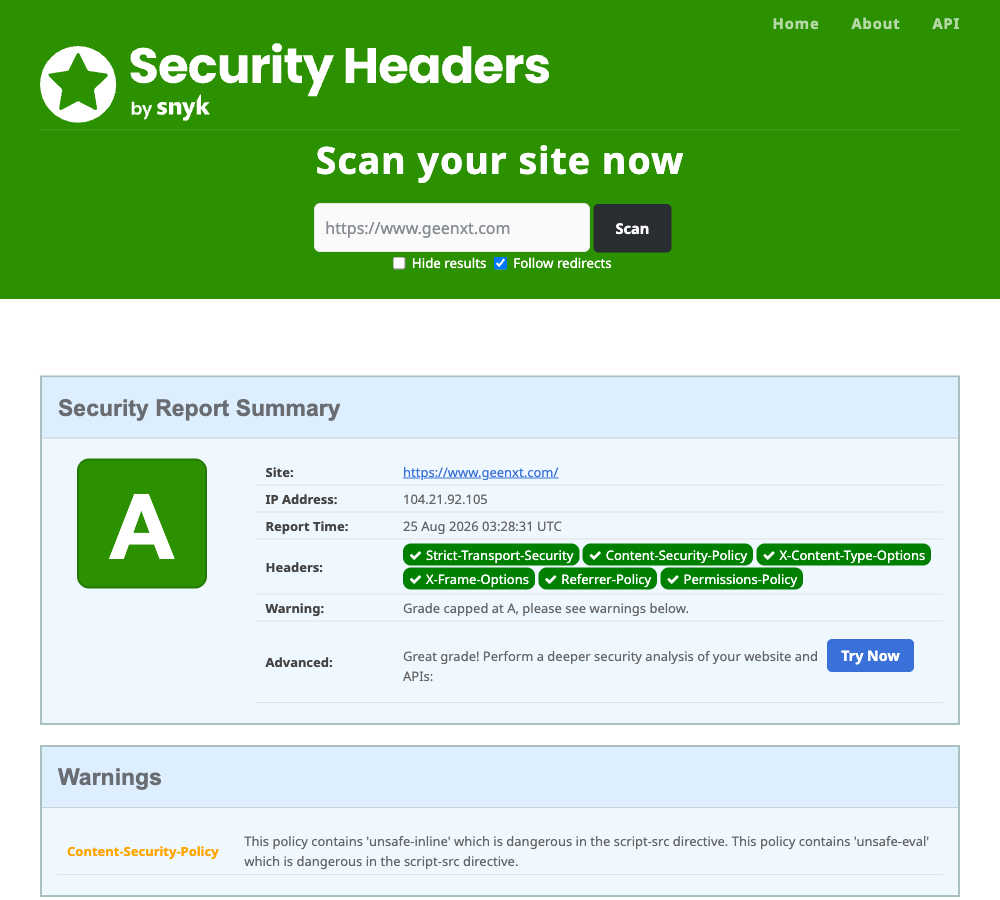
A content security policy is one of the most important browser-side controls. CSP can define which script, style, image, frame, and connection sources are allowed. Other useful headers include Strict-Transport-Security, X-Content-Type-Options, Referrer-Policy, Permissions-Policy, and frame protection through CSP frame directives.
Security headers need testing because overly strict settings can break analytics, forms, embeds, checkout tools, or third-party scripts. Start by auditing current headers, then apply improvements carefully. For more detail, see this guide to security headers for WordPress.
11. Insecure File Uploads
File upload features are useful for contact forms, support portals, user profiles, job applications, and media libraries. They are also risky when not controlled. Attackers may try to upload executable files, oversized files, malware, disguised file types, or files that exploit image processing libraries.
Mitigation includes restricting allowed file types, checking MIME types, renaming uploaded files, storing uploads outside executable paths when possible, scanning files, limiting file size, and requiring authentication for sensitive uploads.
File upload security is also a privacy issue. If customers upload documents, resumes, IDs, or contracts, the site must prevent unauthorized access. That requires secure storage, access controls, and retention rules, not just a working upload form.
12. Poor Logging, Monitoring, and Incident Readiness
Some website owners only discover a security issue after search rankings drop, customers complain, browsers show warnings, or the hosting provider suspends the account. Poor logging and monitoring turn small incidents into long-running problems because nobody sees the early signs.
Useful monitoring includes uptime checks, malware scanning, file change detection, login monitoring, update alerts, server error logs, traffic anomaly alerts, and search visibility checks. Logs should help answer who logged in, what changed, when the issue started, which files were modified, and which requests looked suspicious.
Incident readiness does not need to be complex. Maintain clean backups, document hosting and DNS access, know who can approve emergency changes, keep vendor contacts available, and test restore procedures before a crisis.
How to Prioritize Website Security Work
The best security plan starts with the highest-likelihood, highest-impact issues. For many business websites, that means patch known vulnerabilities, protect administrator access, configure backups, review plugins and themes, add a web application firewall, set security headers, monitor for malware, and document a response process.
Do not treat website security as a one-time cleanup. New vulnerabilities appear, plugins change, staff access changes, content workflows evolve, and attackers adjust tactics. A quarterly security review is more realistic than waiting until something breaks.
Common website security threats are manageable when they are visible. Layered security creates resilience: secure code reduces exploitability, updates reduce known vulnerabilities, authentication protects access, headers protect browser behavior, monitoring improves detection, and training reduces human error.
When to Request a Security Audit
Request a security audit if your website handles customer data, accepts payments, supports user accounts, depends on many plugins, has not been reviewed recently, or has already shown suspicious behavior. Warning signs include unknown admin users, unexpected redirects, search result spam, browser security warnings, sudden traffic drops, repeated login attacks, strange files, unexplained server load, or outdated software that cannot be updated safely.
A good audit should connect findings to practical remediation. The output should explain the likely impact, where the issue appears, how urgent it is, and what should be fixed first.
Primary CTA: Request a security audit to identify the highest-priority website security risks and build a practical remediation plan.
Frequently Asked Questions
What are the most common website security threats?
The most common website security threats include SQL injection, cross-site scripting, DDoS attacks, malware, brute force login attempts, phishing, vulnerable plugins, outdated software, broken access control, security misconfiguration, insecure file uploads, and missing security headers. The exact priority depends on the website platform, hosting setup, user roles, and data sensitivity.
How does the OWASP Top 10 help with website security?
The OWASP Top 10 helps website owners and developers understand recurring web application security risks. It groups common weaknesses into categories such as broken access control, injection, security misconfiguration, vulnerable components, and authentication failures. It is useful for prioritizing reviews, audits, developer training, and remediation planning.
Are WordPress websites more vulnerable to security threats?
WordPress is widely used, so it is frequently scanned by attackers. The biggest risks usually come from outdated plugins, abandoned themes, weak passwords, excessive administrator access, insecure hosting, and poor configuration. A well-maintained WordPress site with updates, backups, strong authentication, security headers, and monitoring can be significantly safer than an unmanaged site.
What is the difference between malware and a vulnerability?
A vulnerability is a weakness that can be exploited, such as an outdated plugin or unsafe input handling. Malware is malicious code or content that may appear after a weakness has been exploited. Cleaning malware without fixing the original vulnerability can lead to reinfection, so both cleanup and root-cause remediation are important.
Does content security policy stop all XSS attacks?
No. Content security policy is an important defensive layer, but it does not replace secure coding, output encoding, sanitization, and safe JavaScript practices. CSP can reduce the impact of unauthorized scripts and make some XSS attacks harder to execute, but it must be configured and tested carefully to avoid breaking legitimate site features.
How often should a website security review be done?
Most business websites should review security at least quarterly and after major changes such as redesigns, hosting migrations, new plugins, or ecommerce updates. Higher-risk websites should use more frequent monitoring and formal audits. Security reviews should include updates, access control, backups, logs, headers, malware checks, and configuration settings.