Direct answer: Choosing between QUIC.cloud and Cloudflare depends on your origin web server and caching requirements. If your WordPress site runs on LiteSpeed Web Server or OpenLiteSpeed, QUIC.cloud provides superior integration through the LiteSpeed Cache plugin, offering native Edge Side Includes (ESI) for WooCommerce carts and automated tag-based cache purging. If your origin runs Apache or Nginx, Cloudflare is the better choice, providing an Anycast network of over 300 edge locations, faster DNS resolution, and mature enterprise security protections.
Website performance optimization is often treated as choosing a favorite tool and toggling options. Site owners search for a fast caching plugin, turn on a content delivery network, and expect Time to First Byte (TTFB) to drop into the green zone. In practice, a content delivery network is only as effective as the architecture connecting it to your origin web server. Clients regularly ask whether they should move from Cloudflare to QUIC.cloud after migrating to LiteSpeed hosting, or whether Cloudflare Automatic Platform Optimization (APO) is worth the recurring monthly cost. Both platforms deliver static assets and cache full HTML pages at the edge, but they solve bottlenecks from fundamentally different angles.
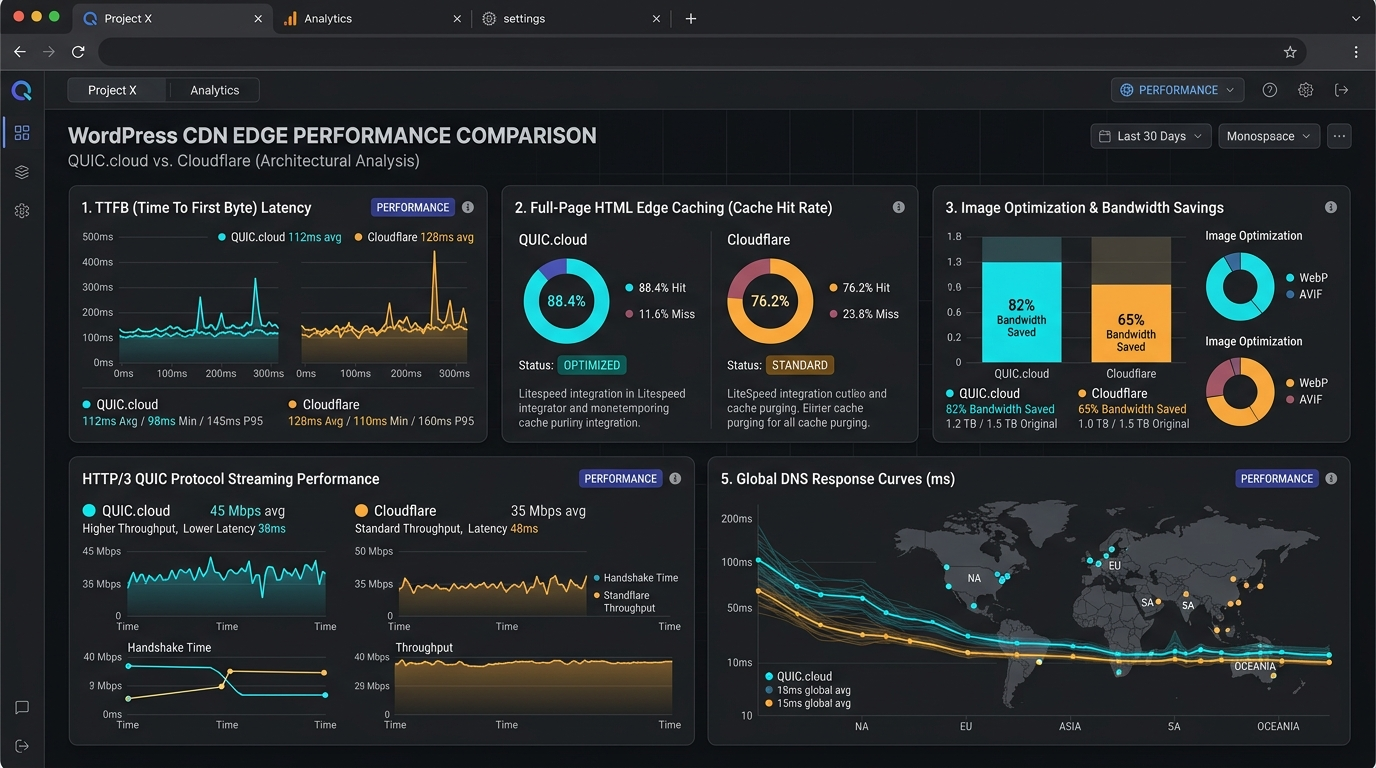
Across more than ten years of hands-on WordPress development and over 10,600 billed hours on Upwork, I have configured both networks across hundreds of production sites. In this guide, we evaluate quic.cloud vs cloudflare across server integration, edge HTML caching, static asset delivery, security defenses, and pricing. We also examine the trade-offs between litespeed quic cloud vs cloudflare and compare cloudflare apo vs quic cloud so you can select the right architecture for your stack. If your website needs tailored server tuning or hands-on configuration, explore our managed website performance solutions and dedicated WordPress support plans.
Architecture Comparison: Server-Level Caching vs Reverse Proxy Edge
To evaluate how these platforms perform, you must understand where each operates in the network request lifecycle.
QUIC.cloud: Native Server-Level Edge Integration
QUIC.cloud was built by LiteSpeed Technologies specifically for WordPress sites on LiteSpeed Web Server (LSWS) and OpenLiteSpeed (OLS). Rather than acting as a detached reverse proxy, it operates as an external edge extension of the web server engine.
When a browser requests a page, the edge node communicates directly with the LiteSpeed Cache (LSCache) engine on your origin host. LiteSpeed tags every cached item with internal cache tags. When you update content, the origin server signals edge nodes to purge only the specific tags associated with that change, eliminating PHP execution overhead on cache hits while maintaining precise cache invalidation. It functions as an integrated wordpress cdn plugin companion.
Cloudflare: Global Anycast Reverse Proxy
Cloudflare takes an infrastructure-first approach, operating as an authoritative Anycast reverse proxy at the DNS layer. Regardless of whether your origin runs Apache, Nginx, LiteSpeed, or containerized clusters, Cloudflare sits in front of your domain.
DNS queries resolve to Cloudflare Anycast IP addresses. Cloudflare inspects requests, enforces firewall rules, serves cached assets or HTML pages, and forwards traffic to origin servers only upon cache misses. Its advantage is pure global scale, operating within milliseconds of almost every internet exchange point worldwide.
HTML Edge Caching and Dynamic Content Handling
Serving static images and stylesheets from a CDN is straightforward. The real test of a WordPress CDN is how effectively it caches dynamic HTML pages while handling dynamic exceptions like customer carts and member accounts.
QUIC.cloud HTML Caching, Guest Mode, and ESI
Full-page HTML caching at the edge allows visitors to download initial web documents from nearby points of presence rather than waiting for origin PHP execution. QUIC.cloud delivers native edge HTML caching through LiteSpeed Cache.
Two capabilities distinguish QUIC.cloud for dynamic sites:
- Guest Mode and Guest Optimization: First-time visitors receive an aggressively cached static HTML snapshot and pre-optimized CSS/JS bundles. Session initialization is deferred until user interaction, lowering initial TTFB.
- Edge Side Includes (ESI): Standard CDNs operate on an all-or-nothing model where dynamic pages bypass the cache entirely. QUIC.cloud supports Edge Side Includes, splitting pages into blocks. The primary product template stays cached at the edge, while dynamic fragments like cart counts are requested separately and injected at the edge.
For high-traffic WooCommerce stores, ESI preserves high cache hit rates without breaking shopping cart sessions.
Cloudflare Automatic Platform Optimization (APO) and Cache Rules
Standard Cloudflare setups cache static files by default, passing HTML requests to origin hosts. Edge HTML caching requires Cloudflare Automatic Platform Optimization (APO) or custom Cache Rules.
Cloudflare APO costs $5 per month on free accounts (included in paid plans). It caches HTML documents across Cloudflare edge servers, using a companion plugin to monitor content changes and automate purges.
APO monitors logged-in cookies and WooCommerce cart cookies like woocommerce_items_in_cart. Once a shopper adds an item to their cart, Cloudflare bypasses edge caching and routes subsequent requests directly to your origin.
While APO is fast, it lacks native ESI support. When a shopper adds an item to their cart, every subsequent page view hits the origin server, increasing server load during high-traffic promotional periods.
Static Asset Delivery, Protocols, and Network Footprint
Beyond page caching, asset delivery speed depends on modern network transport protocols and geographic edge distribution.
HTTP/3 and QUIC Protocol Support
Both platforms support HTTP/3 over UDP and QUIC. Traditional HTTP/2 over TCP suffers from head-of-line blocking: a single dropped packet on a mobile connection halts all streams until retransmitted. QUIC multiplexes streams independently over UDP, ensuring a dropped packet on an image does not delay stylesheet or font delivery. Both platforms handle HTTP/3 negotiation cleanly.
Global Network Scale
Network scale is where Cloudflare holds a structural advantage:
- Cloudflare Network: Operates data centers across 300+ cities in over 100 countries, routing visitors via Anycast with sub-15ms latency in major markets, paired with the fastest public Anycast DNS resolver.
- QUIC.cloud Network: Operates approximately 80 points of presence divided into Tier 1 (North America, Europe) and Tier 2 (Asia, South America, Oceania). While Tier 1 routing is fast, coverage across secondary regions is smaller than Cloudflare.
For audiences distributed across South America, Africa, and regional Asian hubs, Cloudflare Anycast provides wider coverage. To learn more about network routing, read our guide on the best CDN for WordPress.
Pricing and Cost Breakdown: Finding the Cheapest CDN for WordPress
Evaluating costs requires looking at bandwidth volume, domain count, and optimization features.
Cloudflare Pricing Structure
Cloudflare provides predictable flat-rate pricing:
- Free Plan ($0/month): Unmetered bandwidth for static assets, free SSL certificates, basic DDoS mitigation, and global DNS hosting without unexpected bandwidth charges.
- Cloudflare APO ($5/month per zone): Full-page HTML edge caching for WordPress sites on free plans (included on paid tiers).
- Pro Plan ($20/month per domain): Includes APO, Web Application Firewall (WAF) managed rulesets, Polish image optimization, and Mirage mobile acceleration.
QUIC.cloud Credit System
QUIC.cloud operates on a pay-as-you-go credit system tied to origin server licensing:
- LiteSpeed Enterprise Hosts: Receives free monthly Tier 1 credits, typically 10GB to 20GB of CDN bandwidth plus image optimization credits.
- OpenLiteSpeed and Standard Hosts: Receives basic monthly credits (around 1GB) and must purchase credits for higher volume.
- Credit Purchases: Credits cost $5 for 5,000 credits. 1GB of Tier 1 bandwidth consumes 10 to 40 credits depending on the region. Low-traffic sites on LiteSpeed hosting run virtually free, but high-traffic media sites accumulate recurring usage costs.
When searching for the cheapest cdn for wordpress, Cloudflare Free with $5/month APO offers predictable costs for medium-to-large sites. For small business sites on LiteSpeed Enterprise, QUIC.cloud free allowances often cover total monthly requirements at zero extra cost.
Security, DDoS Mitigation, and WAF Capabilities
A CDN must protect your origin server from bot traffic, brute force attempts, and scrapers in addition to accelerating assets.
Cloudflare Security and Threat Intelligence
Cloudflare is an industry benchmark in edge security. Proxying a massive share of global web traffic allows its systems to detect threats in real time:
- DDoS Mitigation: Absorbs multi-terabit volumetric attacks at the edge without origin degradation.
- Bot Fight Mode: Challenges suspicious automated crawlers using JavaScript detections before requests reach your server.
- Web Application Firewall (WAF): Managed rulesets protect against SQL injection, XSS, and WordPress zero-day vulnerabilities.
QUIC.cloud Security Features
QUIC.cloud offers targeted security for WordPress environments:
- Brute Force Protection: Shields login endpoints and XML-RPC from automated dictionary attacks.
- Access Rules: Enables IP, subnet, and country-level whitelisting and blacklisting.
- reCAPTCHA Integration: Intercepts suspicious traffic with challenges at the edge before queries touch the server.
- Traffic Rerouting: Reroutes severe traffic surges to mitigation centers during attacks.
While QUIC.cloud security covers standard WordPress risks, enterprise deployments needing granular rate limiting and deep compliance logs will prefer Cloudflare.
Decision Matrix: QUIC.cloud vs Cloudflare Comparison Table
Use this technical comparison table to evaluate how both platforms match your existing server configuration and performance priorities:
| Feature / Dimension | QUIC.cloud | Cloudflare (Free + APO / Pro) | Performance Winner |
|---|---|---|---|
| Primary Architecture | Direct LiteSpeed server edge extension | Anycast DNS reverse proxy | Architecture dependent |
| Native Server Compatibility | LiteSpeed Enterprise and OpenLiteSpeed | Any web server (Apache, Nginx, LiteSpeed) | Cloudflare (universal support) |
| HTML Edge Caching | Native via LiteSpeed Cache plugin | Available via Cloudflare APO ($5/mo) or Cache Rules | QUIC.cloud on LiteSpeed |
| Dynamic Fragment Support | Edge Side Includes (ESI) for WooCommerce | No native ESI (requires Cloudflare Workers) | QUIC.cloud |
| Network Scale | Approx. 80 regional points of presence | Over 300 global edge data centers | Cloudflare |
| DNS Performance | Standard Anycast DNS | Fastest public Anycast DNS resolver | Cloudflare |
| Static Asset Bandwidth | Credit-based consumption | Completely unmetered on free plan | Cloudflare |
| Image Optimization | Credit-based WebP generation | Polish included on Pro ($20/mo) | Volume dependent |
| DDoS and WAF Defenses | WordPress-specific brute force filters | Enterprise Anycast DDoS and managed OWASP WAF | Cloudflare |
| Setup Complexity | Configured via LSCache with DNS or CNAME mapping | Configured via nameservers or CNAME setup | Tie |
When to Choose QUIC.cloud
Select QUIC.cloud if your infrastructure matches these scenarios:
- Your Host Runs LiteSpeed: On LiteSpeed Web Server Enterprise, QUIC.cloud pairs with LiteSpeed Cache for minimal configuration and high cache hit rates.
- You Run an Active WooCommerce Store: If your store needs dynamic cart caching, QUIC.cloud ESI keeps product pages cached at the edge without breaking customer sessions.
- You Want Consolidated Optimization: LiteSpeed Cache and QUIC.cloud handle critical CSS, image conversion, and CDN caching inside a single plugin interface.
For guidance on eliminating database bottlenecks alongside CDN deployment, review our guide on WordPress performance optimization.
When to Choose Cloudflare
Select Cloudflare if your setup meets these criteria:
- Your Origin Runs Apache or Nginx: On traditional Apache, Nginx, or Docker stacks, Cloudflare provides superior edge caching via APO and faster asset delivery than QUIC.cloud.
- You Have a Global Audience: Cloudflare broader Anycast footprint provides lower latency across South America, Asia, and Oceania.
- You Need Predictable Bandwidth Costs: For high-traffic sites streaming large static assets, Cloudflare unmetered static bandwidth prevents surprise invoices.
- Security and DDoS Defense Are Top Priorities: If your site faces frequent bot attacks or volumetric floods, Cloudflare edge firewall delivers superior protection.
Can You Use QUIC.cloud and Cloudflare Together?
Developers sometimes ask whether they can stack both services by using Cloudflare for DNS and DDoS protection while routing traffic to QUIC.cloud for edge caching. While technically possible via CNAME mapping, this setup adds operational complexity. Dual-proxy configurations introduce an extra network hop, complicate SSL certificate renewals, and trigger false positives in bot filters. In almost all production scenarios, choosing the single platform that fits your server stack yields cleaner performance.
Professional Website Maintenance and Performance Strategy
Configuring a content delivery network is only one component of maintaining a healthy, resilient WordPress site. Even the fastest CDN cannot compensate for slow database queries, conflicting plugins, outdated PHP runtimes, or unpatched vulnerabilities on your origin server.
At GEENXT, our WordPress maintenance service takes care of your entire software stack, ensuring speed optimizations, security updates, and technical SEO health are managed proactively:
- Care Plan ($49/month): Essential protection for corporate and brochure sites. Includes scheduled cloud backups, staging-first update management, 24/7 uptime monitoring, security hardening, and preferred support rates.
- Professional Plan ($99/month): Comprehensive support for active businesses and lead generation sites. Includes everything in Care plus complete speed optimization, monthly Core Web Vitals audits, and two hours of dedicated technical or layout edits every month.
- Premium Plan ($499/month): Dedicated engineering support for high-traffic portals and WooCommerce stores. Includes continuous performance profiling, priority SLA response, and unlimited small development tasks.
All plans run month-to-month with no long-term lock-in, cancel anytime flexibility, guaranteed turnaround under 24 hours, and a 7-day money-back guarantee.
Frequently Asked Questions
Is QUIC.cloud completely free for WordPress?
QUIC.cloud provides a recurring free tier for sites on LiteSpeed Enterprise hosting, covering basic monthly bandwidth and image optimization credits. Sites on OpenLiteSpeed, Apache, or Nginx receive smaller allowances and must buy credits for higher traffic.
Does Cloudflare APO work on LiteSpeed web servers?
Yes. Cloudflare APO works regardless of origin server software. However, on LiteSpeed hosts, native LiteSpeed Cache with QUIC.cloud offers tighter cache invalidation and native ESI cart caching that APO cannot match without custom Workers.
Do I need to change my domain nameservers to use QUIC.cloud?
No. QUIC.cloud supports CNAME routing. You can keep your existing DNS provider and point your web record to the QUIC.cloud CNAME address provided in your dashboard.
Which CDN is easier to configure for a beginner?
Cloudflare is easier for beginners, requiring only a nameserver update for baseline caching and SSL. QUIC.cloud requires generating a server API key in LiteSpeed Cache, configuring CDN mappings, and setting up DNS records.
Take Control of Your WordPress Speed and Infrastructure
Both QUIC.cloud and Cloudflare deliver significant speed gains when properly matched to your hosting environment. On LiteSpeed, leverage QUIC.cloud native server integration and ESI caching. On Apache, Nginx, or when enterprise security is required, Cloudflare remains the benchmark for global delivery.
If you want experienced engineers to audit your server stack, configure optimal edge caching, and keep your website running fast, explore our flexible WordPress support plans or contact our engineering team today.
Reviewed by: Mark Anthony Garcia, GEENXT WordPress Support.